Guides
How to Write a Marking Key That AI Grades Accurately
October 2026 · 8 min read · By Proctor AI Team
When teachers tell us the AI marked something wrongly, the fix is usually in the marking key, not the AI. Think of the key as the briefing you would give a new teacher who is helping you mark for the first time. If the briefing is vague, so are the marks.
The basic shape
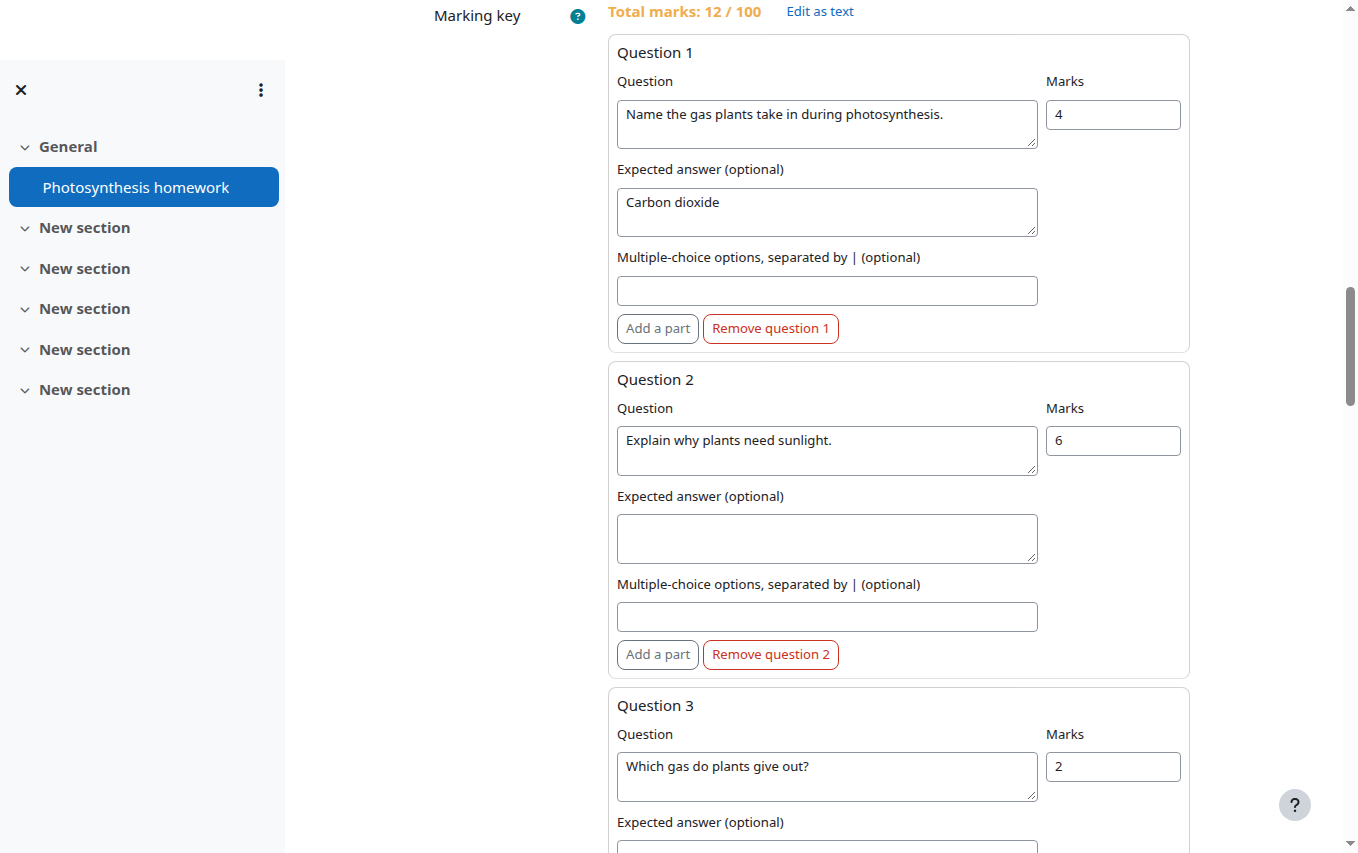
Each question needs three things: the question as students saw it, the marks it is worth, and the expected answer. In the Proctor AI Moodle plugin you fill these in one question at a time. If you prefer typing, the text version looks like this:
1. Name the gas plants take in during photosynthesis. [1] Answer: Carbon dioxide
Rule 1: Say what earns each mark
For anything worth more than one mark, list the points that earn marks rather than writing a perfect model answer. A model answer tells the AI what good looks like. A list of points tells it how to split the marks.
| Weak expected answer | Better expected answer |
|---|---|
| Photosynthesis is how plants make food using sunlight. | 1 mark: uses light energy. 1 mark: carbon dioxide and water in. 1 mark: glucose (or sugar) and oxygen out. |
| The answer is x = 4. | 1 mark: correct equation set up (2x + 3 = 11). 1 mark: correct working. 1 mark: x = 4. |
Rule 2: Tell it what else is acceptable
Students rarely use your exact words. If CO2, carbon dioxide and carbon-dioxide are all fine, say so. If any correct example earns the mark, say that too. Accept any prime number less than 20 is clearer than Answer: 7.
Rule 3: Use parts for multi-part questions
Questions with parts (3a, 3b, 3c) should be entered as parts, each with its own marks. The AI then marks each part separately and you see each one in the grader. Putting three parts into one big question makes it harder to see where marks were lost.
Rule 4: Put the house rules in the instructions
Anything that applies to the whole paper goes in Instructions for the AI grader. Good examples:
- Accept British or American spelling.
- Give method marks for correct working even if the final answer is wrong.
- Ignore spelling mistakes unless the question is about spelling.
- Students answer any three of questions 4 to 7; count the best three.
- Answers may be written in Hindi or English.
Examples by subject
Maths
Split working and answer. 2 marks: correct substitution into the formula. 1 mark: correct final answer with units. Then add give method marks for correct working to the instructions, so a slip in the last line doesn't cost everything.
Science
List the key terms that must appear. For diagrams, describe what must be labelled: 1 mark each for nucleus, cell membrane and cytoplasm correctly labelled.
Languages and humanities
For a 6-mark paragraph, describe the levels: 1 to 2 marks for a simple statement, 3 to 4 for an explanation with one example, 5 to 6 for a developed argument with two or more examples. Add the level (for example Grade 9) so the AI judges depth correctly.
Multiple choice
Use the options field (for example 4 | 7 | 9) and put the right option in the expected answer. If you have a lot of multiple choice, a Moodle quiz may suit better. AI grading earns its keep on written answers.
Test the key before the whole class
Grade three or four submissions first and look at the marks. If the AI is consistently too strict or too generous on one question, adjust that question's expected answer and grade the rest. It takes five minutes and saves a lot of corrections later.
Frequently asked questions
What is a marking key?
A list of the questions, the marks each is worth and the expected answers or marking points. The AI marks each student's answer against it.
Do I have to write an expected answer for every question?
No, but it is the single best way to improve accuracy. For open questions, list the points that earn marks.
Can I change the marking key after grading?
Yes. Change it in the assignment settings and send the affected submissions again. Each new grading is charged.