Guides
Moodle Marking Workflow With AI Grading: Draft, Review, Release
October 2026 · 5 min read · By Proctor AI Team
Short answer: no. A student never sees an AI mark that a teacher hasn't approved. How that works depends on one Moodle setting, Use marking workflow, under Grade in the assignment settings.
With marking workflow (recommended for exams)
Marking workflow gives every student a state: Not marked, In marking, Ready for review, In review, Ready for release, Released. Students only see grades and feedback once the state is Released.
- AI marks arrive as a draft: The AI grade is filled into the grade box and the student moves to Ready for review. The gradebook stays empty.
- You review: Open each student in the grader, check the flagged questions, change marks and feedback, and save.
- You release: Set the state to Released, one student at a time or for many students with the bulk action. Only now do students see anything.
Two safety rules sit underneath. The AI only fills in the grade when it is a points grade, with no rubric, and when no teacher has graded that attempt yet. And once a grade is Released, the plugin won't send that student's work again. If you want a fresh AI result, set the state back to In review first.
Without marking workflow (fine for homework)
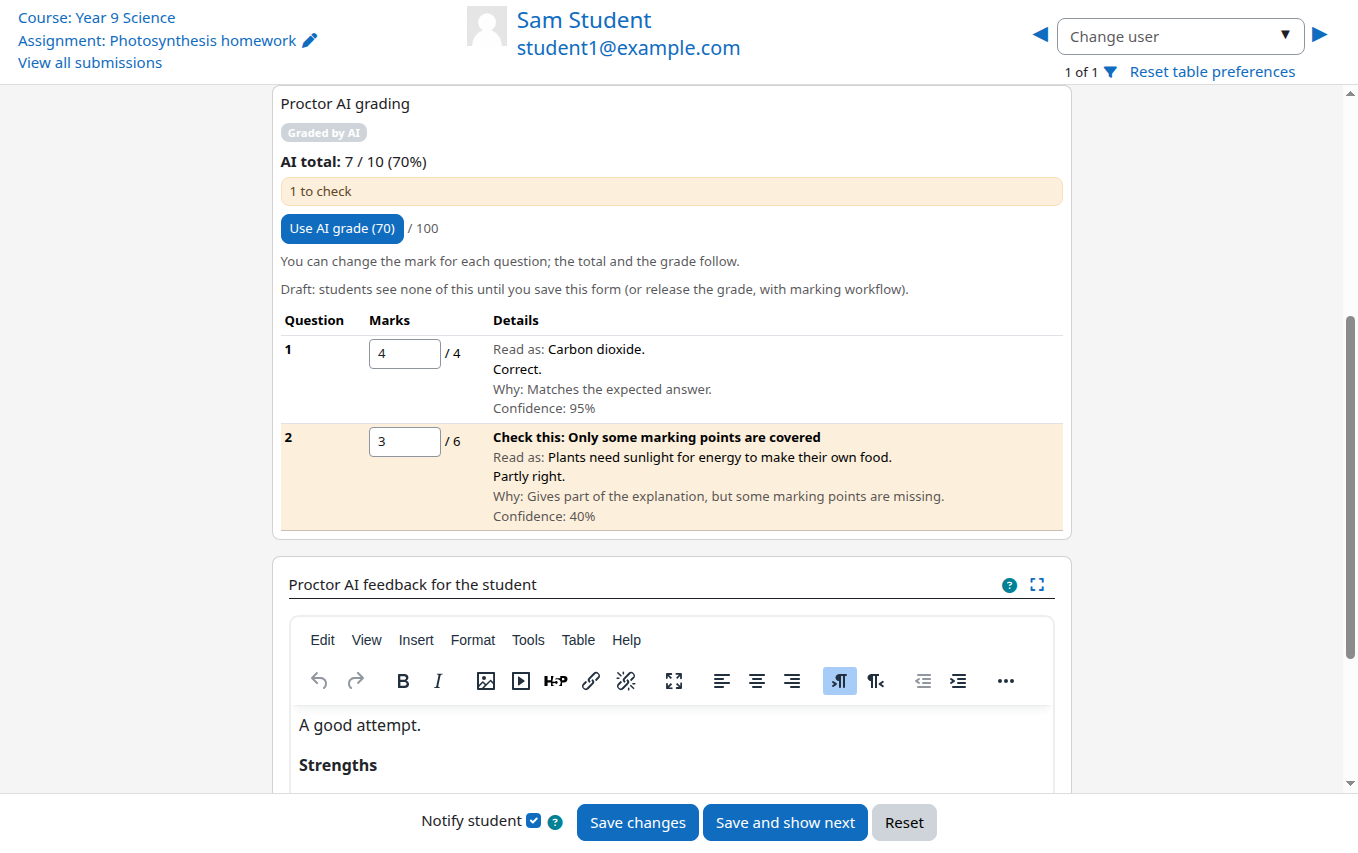
Without workflow, Moodle shows a grade as soon as it is saved. So the plugin doesn't save one. The AI result waits in the grader panel as a suggestion, and the grade box stays empty.
- Open a student, check the panel, click Use AI grade or type your own, and save. That student now has a grade.
- Or select many students and choose Apply Proctor AI marks from the bulk actions. A confirmation page shows who will get a grade and who is skipped, for example because you already graded them.
What if a student changes their work?
If the submission changes while it is waiting to be graded, the old version is dropped and nothing is charged. If it changes after you approved or released the result, automatic grading leaves it alone, so the student keeps seeing what you approved. You can send it again yourself; the new result is a draft until you approve it.
Frequently asked questions
Can students see AI grades before the teacher approves them?
No. With marking workflow the grade stays hidden until it is Released. Without workflow, no grade is saved until a teacher saves or applies it.
Should I use marking workflow?
For exams and anything high stakes, yes: it gives you a clear review and release step. For homework, working without it is simpler and just as safe.